
For the past month or so, whenever I tried to add a control to my Visual Studio Toolbox, the IDE would shut itself down. My solution, of course, was to avoid adding tools to my Toolbox.
Finally I decided that I needed to do something, ahem, a little smarter. The specific problem occurred when I tried to use the Context Menu’s “Choose Items…” option on my toolbox. It turns out that the Power Commands (when did I install that?) has a conflict with VS 2008. This apparently can also mess up the class viewer in Visual Studio 2008. There are two work-arounds for this. The first is to hack a config file for your IDE settings. That solution can be found here: http://social.msdn.microsoft.com/Forums/en-US/vssetup/thread/e2434065-9921-4861-b914-9cc9d6c55553/
Unfortunately this didn’t work for me. The second work-around is simply to uninstall the Power Commands. If you go into Add/Remove Programs, it is listed as PowerCommands for Visual Studio 2008.
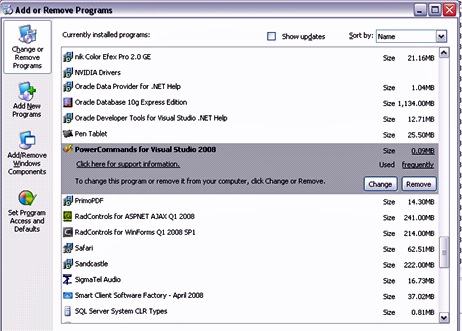
Oddly enough, Add or Remove Programs says I used this particular tool frequently, even though I’m not exactly sure of how I used it.
Had the same problem – what worked for me was a simple over the top install of the Power Commands – no need to uninstall the old version first – http://code.msdn.microsoft.com/PowerCommands/Release/ProjectReleases.aspx?ReleaseId=559
I’m assumming the SP1 installed PowerCommands in the first place?
Stuart,
I was able to re-install power commands later, and everything was fine.
I strongly suspect that the Resharper beta caused these issues for me. It had been causing these shutdown problems when I first installed Resharper, and I think uninstalling it never completely solve them.
James
Excellent stuff from you, man. I’ve read your things before and you are just too awesome. I adore what you have got right here. You make it entertaining and you still manage to keep it smart.
This is truly a great blog thanks for sharing…